Assignment


3.1 Blue-Green Deployment & Artifact Registry
In this assignment we create a Blue-Green deployment for an application. Blue is the production version of the application, Green is a new (test-)version.
The application is the same as in week 1 and 2. The Blue version is in the main branch of the GitHub repository, the Green version is in another branch, for example the test branch.
To store the docker images we now use the Google Artifact Registry, an alternative for Docker Hub.
A pipeline is created so that when the code changes, the docker image is built and the image is started in a pod on the Kubernetes cluster in Google.
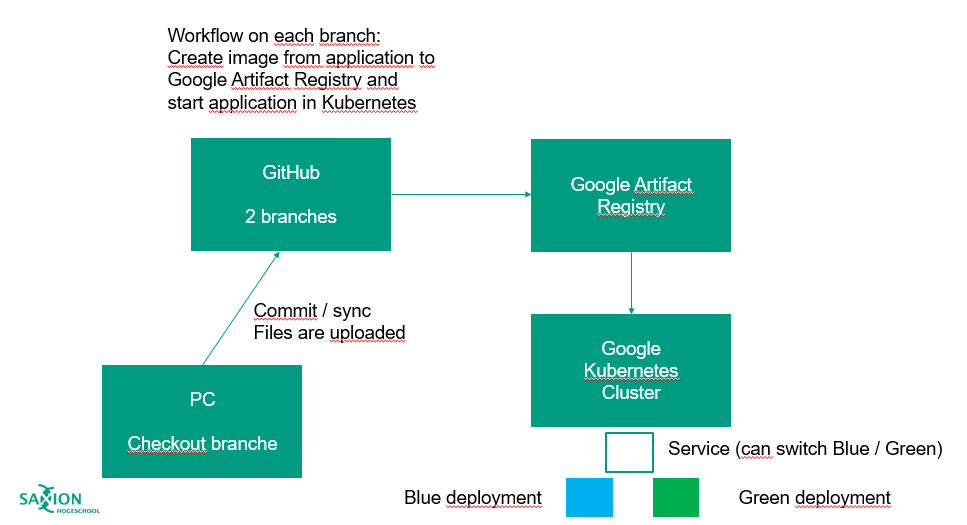
Do the following steps:
- Create a Kubernetes cluster with Google GKE.
- Create a GitHub Repository with two branches (
mainand for exampletest). Themainbranch contains the production version of the application; thetestbranch the test version. The application is the same as in week 1 and 2 (the test version has some changes in theindex.htmlfile). - Create a Google Artifact Registry to store the docker images with the application (this as an alternative for DockerHub).
- Create a CI/CD pipeline for each branch and use environment variables for region, cluster etc. Use https://medium.com/@gravish316/setup-ci-cd-using-github-actions-to-deploy-to-google-kubernetes-engine-ef465a482fd for setting up the pipeline. Adjust the given pipeline so it works in your environment.
- Create deployments and the service for a Blue-Green deployment.
- Deploy and test the production and test version of the application to the Kubernetes cluster by using the pipeline.
- Switch from blue to green and backwards by editing the service. Check if the switch works correctly.
3.2 Other CI/CD Tools
Other tools like GitHub Actions are Argo CD and Flux CD. Investigate what those tools are and what the difference is with GitHub Actions.